![Beeye (Text).svg]](https://support.mybeeye.com/hubfs/Beeye%20(Text).svg)
Beeye provides a feature in access rights that allows you to control the time entries of collaborators:
-
Allow or block the submission of a timesheet if the entered time is less than the defined work week.
-
Allow or block the submission of a timesheet if the entered time is more than the defined work week.
To make this work:
-
Define the work week in the Team settings, either for each collaborator individually or for the entire team.
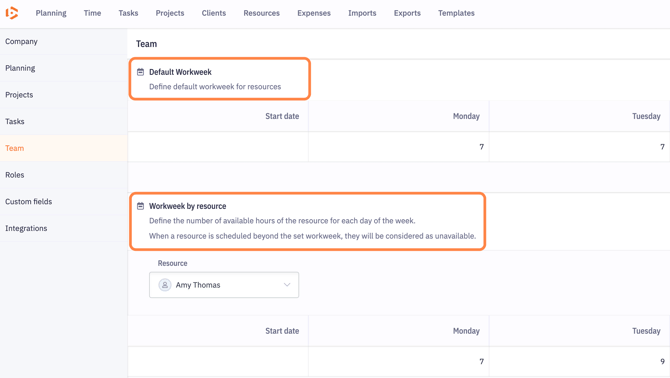
-
Activate the option in the role-based access rights.
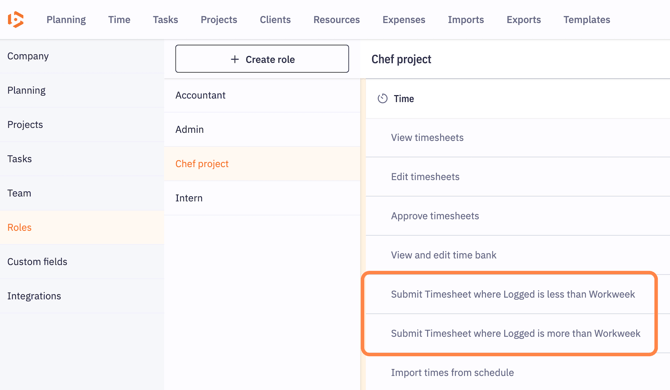
Once activated:
-
The system provides a visual alert via color if the entered time is below or above the limit.
-
Upon submission, a message will block the action if the entry does not respect the defined limits.

Practical solution (in extreme cases):
If the time entered exceeds the total hours of the resource’s work week (for example, 10 hours for a resource who only works 8 hours per week), you can:
-
Split the time entry across multiple days so that the total time does not exceed the weekly work limit.